
How many handwritten food orders does your restaurant take every day?
Imagine replacing every one of them with a QR code and having each order appear instantly in your kitchen.
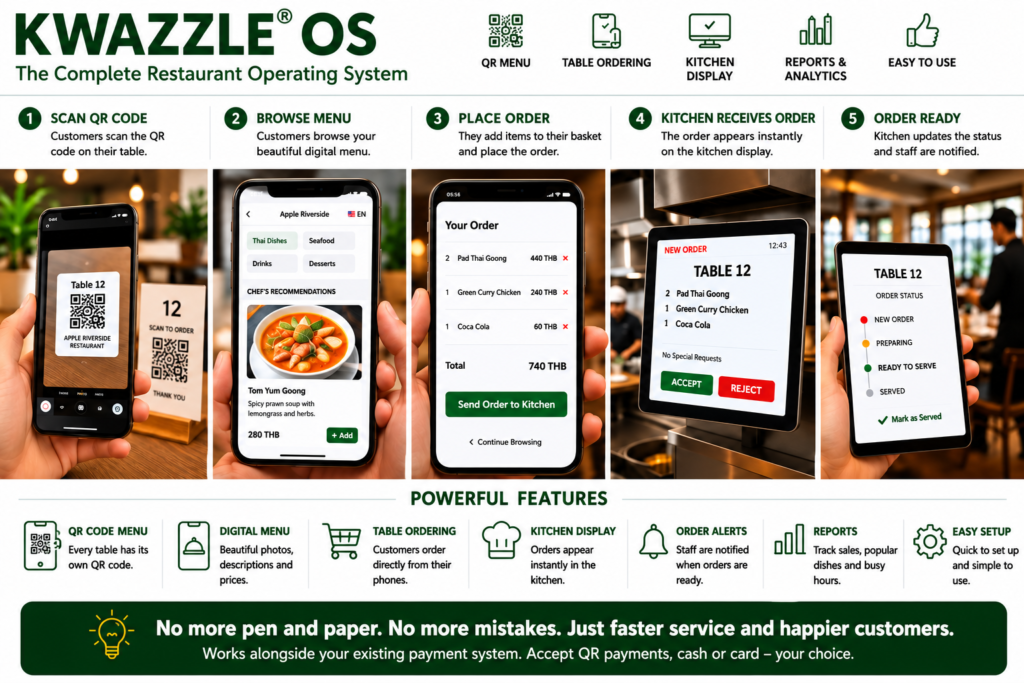
How Restaurant OS Works
Restaurant OS has been created to simplify the way restaurants operate by replacing handwritten food orders with a fast, modern digital ordering system. It has been designed to work alongside your existing business, allowing you to continue accepting your preferred payment methods while dramatically improving communication between customers, waiting staff and the kitchen.
Step 1 – Customer Takes a Seat
Every table in your restaurant is allocated a unique QR code. Customers simply sit down, scan the QR code using the camera on their own smartphone and instantly access your restaurant’s digital menu.
There is no app to download, no registration required and no complicated setup. Within seconds your menu is available on any modern smartphone.
Step 2 – Browse Your Beautiful Digital Menu
Instead of looking through worn paper menus, customers enjoy a modern digital experience with large food photographs, detailed descriptions and easy-to-read prices.
Restaurant OS allows customers to search your menu instantly by:
- 🍗 Chicken
- 🦞 Seafood
- 🌶 Spicy Dishes
- 🌱 Vegetarian
- 🥗 Vegan
- ⭐ Chef’s Recommendations
- 💰 Budget Meals
- 🍰 Desserts
- 🍷 Drinks
Menus can be displayed in multiple languages, making Restaurant OS ideal for restaurants welcoming both local and international visitors.

Step 3 – Customers Place Their Order
When customers have made their selections, they simply press Send Order.
Their complete order is transmitted instantly to the restaurant’s kitchen without the need for handwritten order pads or manual communication between waiting staff and chefs.
Special requests such as “No Chilli”, “Extra Rice” or “No Peanuts” can easily be included with the order.
Step 4 – Orders Arrive Instantly in the Kitchen
Restaurant OS immediately displays every new order on the Kitchen Display Screen.
Each order includes:
- Table Number
- Ordered Dishes
- Special Requests
- Time Ordered
- Current Status
Kitchen staff no longer need to interpret handwritten notes or worry about lost order slips.
Step 5 – Live Kitchen Status
As food is prepared, kitchen staff simply update the order status.
- 🔴 New Order
- 🟠 Preparing
- 🟢 Ready to Serve
- ✅ Served
Waiting staff can instantly see which tables are ready without entering the kitchen or interrupting chefs.
Step 6 – Existing Payment Methods Continue to Work
Restaurant OS has been designed to work alongside your current payment system.
Whether you already accept:
- Thai QR Payments
- PromptPay
- Cash
- Credit Cards
- Debit Cards
there is no need to replace your existing payment process.
Restaurant OS focuses on improving restaurant operations rather than changing the way you receive payment.
Benefits for Restaurant Owners
Restaurant OS helps restaurant owners increase efficiency, reduce mistakes and improve customer service.
Reduce Mistakes
No more unreadable handwriting, lost tickets or incorrect orders.
Faster Service
Orders arrive instantly in the kitchen, reducing delays and improving table turnover.
Increase Sales
Beautiful food photography and featured recommendations encourage customers to order more.
Improve Customer Experience
Customers enjoy a modern digital menu that is easy to browse, simple to understand and available in multiple languages.
Save Time
Staff spend less time writing orders and more time looking after customers.
Easy Menu Updates
Change prices, add new dishes or update photographs in minutes without reprinting menus.
Designed for Every Restaurant
Restaurant OS has been created for businesses of every size, including:
- Restaurants
- Cafés
- Coffee Shops
- Hotels
- Beach Clubs
- Sports Bars
- Rooftop Bars
- Food Courts
- Resorts
- Fine Dining Restaurants
Whether you have ten tables or several hundred, Restaurant OS grows with your business.
The Future of Restaurant Management
Restaurant OS is continuously evolving with exciting new features planned for future releases, including:
- Online Table Reservations
- Customer Ordering from Mobile Phones
- Kitchen Display Systems
- Waiter Management
- Stock Control
- Sales Reporting
- Customer Loyalty Programmes
- Multi-Language Menus
- Hotel Integration
- Event & Wedding Management
- AI Business Analytics
Restaurant OS
No More Pen and Paper. No More Lost Orders. No More Confusion.
Restaurant OS transforms the way restaurants operate by providing a simple, affordable and professional digital operating system that improves efficiency, enhances customer service and helps restaurant owners concentrate on what matters most—serving outstanding food and creating memorable dining experiences.