
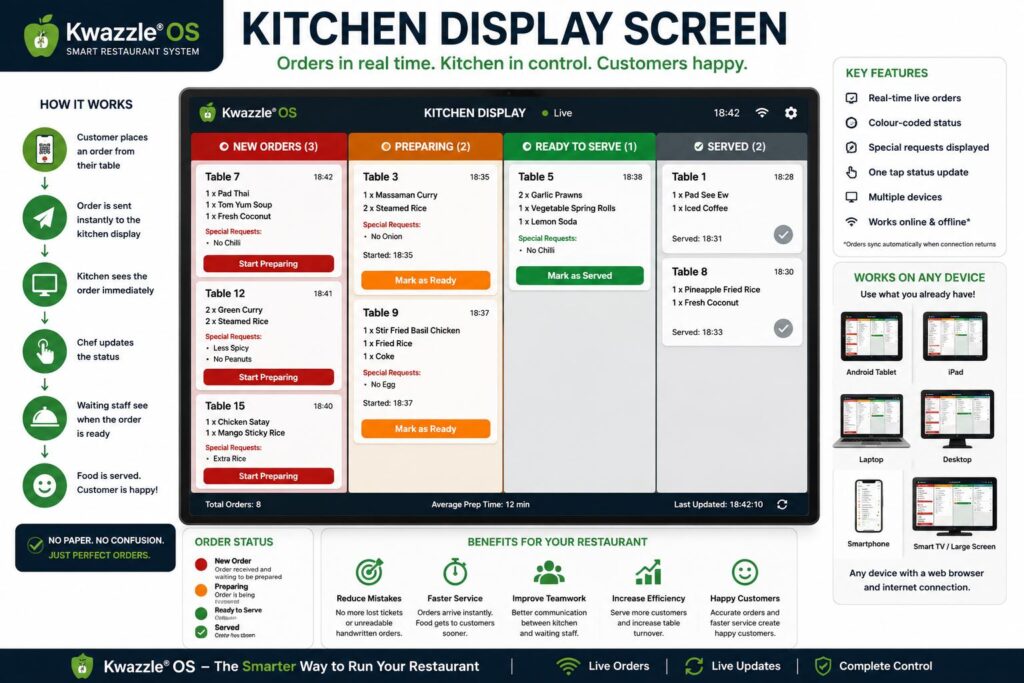
What is a Kitchen Display Screen?
A Kitchen Display Screen (KDS) is simply a digital screen used by your kitchen staff to receive customer food orders.
Instead of waiters writing orders on paper or shouting them into the kitchen, every order appears automatically on a screen the moment the customer places it.
Think of it as replacing paper order tickets with a modern digital display.
How Does It Work?
When a customer scans the QR code on their table and places an order using Kwazzle® OS, the order is instantly sent to the Kitchen Display Screen.
The chef immediately sees:
- Table Number
- Food Ordered
- Quantity of Each Item
- Special Requests
- Time the Order Was Placed
- Current Order Status
There is no waiting for a member of staff to walk into the kitchen with a handwritten order.
What Does the Kitchen Display Screen Look Like?
Imagine a television, computer monitor, tablet or iPad mounted on the kitchen wall.
Instead of showing television programmes, it displays a live list of customer orders.
As new orders arrive, they automatically appear on the screen.
Kitchen staff simply touch the screen or click a button to update the order status as they prepare each meal.
What Equipment Do I Need?
The good news is that you probably already own everything you need.
Kwazzle OS works with almost any internet-connected device, including:
- 📱 Android Smartphones
- 📱 Apple iPhones
- 📲 Android Tablets
- 📲 Apple iPads
- 💻 Windows Laptops
- 💻 Apple MacBooks
- 🖥 Desktop Computers
- 🖥 Touchscreen Monitors
- 📺 Smart TVs with a web browser
- 🖥 Large Commercial Display Screens
Simply open the secure Kitchen Display page in your internet browser and leave it running during service.
No expensive specialist equipment is required.
Why Use a Kitchen Display Screen?
A Kitchen Display Screen helps your restaurant become faster, more organised and more efficient.
Instead of using handwritten order pads, every order is stored digitally and displayed instantly for the kitchen.
This means:
- No unreadable handwriting.
- No lost paper tickets.
- No forgotten special requests.
- Faster communication between the dining area and the kitchen.
- More accurate food preparation.
- Faster customer service.
- Better teamwork between chefs and waiting staff.
A Simple Example
Imagine a customer sitting at Table 8 orders:
- Pad Thai
- Chicken Satay
- Fresh Coconut
They also request:
“No Peanuts”
Within seconds, the Kitchen Display Screen automatically shows:
Table 8
- 1 × Pad Thai
- 1 × Chicken Satay
- 1 × Fresh Coconut
Special Request: No Peanuts
The chef begins preparing the meal immediately without waiting for anyone to deliver the order.
Designed for Every Restaurant
Whether you run a small café with ten tables or a large restaurant serving hundreds of customers each day, a Kitchen Display Screen helps your kitchen stay organised and your staff work more efficiently.
With Kwazzle OS, you can introduce a professional Kitchen Display System using equipment you may already own, making it an affordable and practical upgrade for restaurants of any size.